7 Best Mounts for Garmin ECHOMAP Ultra 2 Fish Finders (November 2026)
The best Garmin ECHOMAP Ultra 2 mounting options include the Garmin Mount w/Cradle for Ultra 102sv and 106sv, the Garmin Bail Mount with Quick Release for a removable Garmin display, and the Vadaxx Fish Finder Mount Base for dual-angle adjustment.
On this page (6 sections)
The best Garmin ECHOMAP Ultra 2 mount for a 102sv or 106sv is the Garmin Mount w/Cradle, which has a bail mount, tilt adjustment and quick-release cradle. For other sizes, check the exact model fit and mounting pattern before choosing a universal ball mount.
The right mount affects how easily you can see and reach the display at the helm. A cradle gives you a direct seat-and-release setup, while an arm and ball joints give you more choice over height and angle.
This roundup compares Garmin’s cradle options with adjustable mounts from Vadaxx, WINDFRD and VAZESWIN. We checked the stated fit, mount style and adjustment details, and included a Garmin adapter that is not intended for ECHOMAP displays so the compatibility distinction is clear.
If you're still choosing a display family, compare Garmin ECHOMAP Ultra vs GPSMAP before planning the helm. Screen size and mounting style should work with the boat layout you already have.
Our picks at a glance
-
1

-
2
 Best for a removable Garmin display
Garmin Bail Mount with Quick Release
9.6/10 our score
See it on Amazon -
3
- 4
 Check it
WINDFRD Aluminum Fish Finder Mount for Boat
Best for a raised viewing position - 5
 Check it
VAZESWIN 1.5" Ball Aluminum Alloy Fish Finder
Best for a long adjustable arm - 6
 Best for compatible inReach devicesCheck it
- 7
 Check it
VAZESWIN 2.25" Ball Large Heavy-Duty Aluminum Alloy
Best for a larger ball-mount system
Which Garmin ECHOMAP Ultra 2 mounts are the best fit?
The Garmin Mount w/Cradle is the clearest choice for the Ultra 102sv and 106sv because those models are named in its compatibility details. The other options vary in arm length, adjustment and model fit, so match the display to the bracket before drilling.
Our score weighs specs, features and buyer feedback against what you're shopping for. Fit for the exact display model matters most here, followed by adjustment range and how clearly the mount’s compatibility is described.
| Product | Best for | Compatible models | Mount style | Adjustment | Our score |
|---|---|---|---|---|---|
| Garmin Mount w/Cradle | Ultra 102sv and 106sv | ECHOMAP Ultra 102sv and 106sv | Bail mount with quick-release cradle | Tilt | 9.7 |
| Garmin Bail Mount with Quick Release | a removable Garmin display | Bail mount with quick-release cradle | Tilt | 9.6 | |
| Vadaxx Fish Finder Mount Base | dual-angle adjustment | Dual swivel ball mount | 9.2 | ||
| WINDFRD Aluminum Fish Finder Mount for Boat | a raised viewing position | Drill-down with double socket arm | 8.9 | ||
| VAZESWIN 1.5" Ball Aluminum Alloy Fish Finder | a long adjustable arm | 8.6 | |||
| Garmin Spine Mount Adapter | compatible inReach devices | 8.3 | |||
| VAZESWIN 2.25" Ball Large Heavy-Duty Aluminum Alloy | a larger ball-mount system | 8.0 |
Garmin Mount w/Cradle: Best for Ultra 102sv and 106sv
- Compatible with ECHOMAP Ultra 102sv and 106sv
- Bail mount with knobs
- Tilts for viewing
- Quick-release cradle
This Garmin mount is the most direct match for the Ultra 102sv and 106sv. Its cradle lets you seat or remove the display, and the mount tilts for viewing.
Pros
- Compatibility names the Ultra 102sv and 106sv
- Quick-release cradle
- Tilt adjustment
Cons
- Fit is specified for 102sv and 106sv, not every Ultra 2 size
The Garmin Mount w/Cradle is the most direct match in this group for an ECHOMAP Ultra 102sv or 106sv. Those two models are specifically named, which removes some of the guesswork that comes with a general-purpose plate.
The bail mount uses knobs and tilts for viewing. Its quick-release cradle lets you seat or remove the display, with cables plugged into the cradle so you can leave the wiring in place when taking the unit off.
This setup suits a fixed helm location where you want the screen angled toward the driver and removable when the boat is stored. Confirm your exact model is one of the two supported sizes; compatibility for every Ultra 2 model is not stated.
Choose it for a named Ultra 102sv or 106sv fit and a quick-release cradle. If you have a different size, verify the model match before installation.
Garmin Bail Mount with Quick Release: Best for a removable Garmin display
- Bail mount with knobs
- Quick-release cradle
- Tilts for viewing
This Garmin bail mount has a quick-release cradle and tilt adjustment. Confirm that it fits your exact ECHOMAP Ultra 2 before buying, since its compatibility details do not name specific Ultra 2 models.
Pros
- Quick-release cradle
- Tilt adjustment
- Garmin bail-mount design
Cons
- Specific ECHOMAP Ultra 2 model compatibility needs confirmation
The Garmin Bail Mount with Quick Release offers the same basic style of setup: a bail mount with knobs, tilt adjustment and a cradle that lets you seat or remove a device. Its compatibility details do not name an ECHOMAP Ultra 2 model, so confirm fit before treating it as a direct match.
The model is described for a compatible ECHOMAP Ultra chartplotter/sounder combo, but its specific device compatibility field is broad. That makes it important to check the exact part and display combination with Garmin or the seller before drilling mounting holes.
A cradle is useful when you want the option to remove the display without taking the installed mount off the boat. For a padded way to carry a removed screen, compare Garmin fish finder carrying cases.
It can also keep cable connections at the mount while the screen is off the bracket.
Choose it when Garmin confirms the cradle fits your Ultra 2. If you need a documented model match, the first pick is clearer for the 102sv and 106sv.
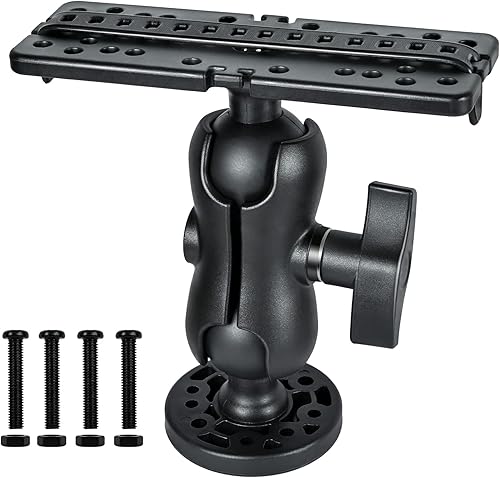
Vadaxx Fish Finder Mount Base: Best for dual-angle adjustment
- Dual 360-degree swivel ball joints
- Flat plate with multiple mounting holes
- Nylon and stainless steel
The Vadaxx has two swivel joints for changing screen angle and a flat plate with several hole positions. Check the plate and hole layout against your display’s mounting pattern.
Pros
- Two adjustable ball joints
- Multiple holes on the flat plate
- Includes screws and nuts
Cons
- ECHOMAP Ultra 2 compatibility is not named
The Vadaxx Fish Finder Mount Base is for boaters who want to adjust the display position with two swivel joints. Its flat plate has multiple mounting holes, and the maker says you can drill additional holes to suit a model.
The mount is made from nylon and stainless steel. The base is 2.6 inches across, and the top plate is 6.3 inches wide.
Use those dimensions to check that the mount fits your available surface and doesn't crowd nearby controls.
Compatibility details list several Garmin families, but do not name the ECHOMAP Ultra 2. Treat this as a possible universal-plate option, not a confirmed Ultra 2 fit.
Compare the screen’s mounting points with the plate and make sure you can reach the side adjustment switch after installation.
Choose it for two-angle adjustment and a broad plate. Confirm the hole layout and mounting surface before making holes in the boat.
WINDFRD Aluminum Fish Finder Mount for Boat: Best for a raised viewing position
- 18.3 in double socket arm
- 6.23 x 2 in mounting plate
- 2.4 in AMPS-pattern base
- Static load capacity: 5 lb
The long arm and ball joints offer a raised, adjustable position. WINDFRD recommends screens up to 7 inches, so verify the display’s size and weight before considering it for an Ultra 2.
Pros
- Long arm provides height and angle options
- Powder-coated aluminum and composite materials
- Includes mounting plate and base
Cons
- Maker recommends screens up to 7 in
- Static load limit is 5 lb
The WINDFRD Aluminum Fish Finder Mount for Boat has the longest arm among these picks, at 18.3 inches. Its double socket joints offer several positioning choices, while the 6.23 x 2-inch plate and AMPS-pattern base attach to a flat surface.
There is an important size limit: WINDFRD states a 5 lb static load capacity and recommends screens up to 7 inches for best results. Larger or heavier displays may sag or shift, so this mount is a poor match for an Ultra 2 screen unless its size and weight meet those limits.
The maker describes powder-coated marine-grade aluminum and composite materials. The included parts are an arm, mounting plate and base, with hardware also described in the fit details.
Choose it for a raised position with a smaller compatible screen. For a larger Ultra 2, prioritize a mount with a confirmed fit and suitable load capacity.
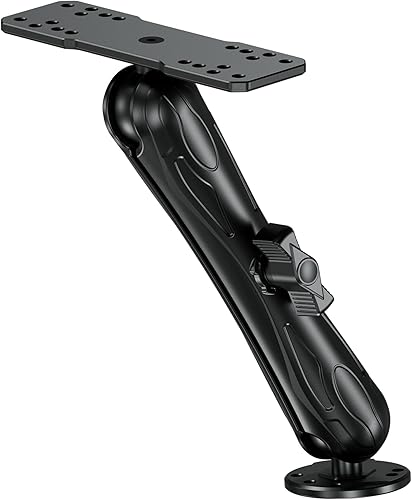
VAZESWIN 1.5" Ball Aluminum Alloy Fish Finder: Best for a long adjustable arm
- 9.1 in double socket arm
- Aluminum alloy plate and base
- 360-degree adjustment
- Ultra 102sv and 106sv named as compatible
This VAZESWIN mount includes a 9.1-inch arm and names the ECHOMAP Ultra 102sv and 106sv among compatible models. Confirm the plate pattern and fit for your specific Ultra 2 unit.
Pros
- Compatibility names Ultra 102sv and 106sv
- Long double socket arm
- Aluminum plate and base
Cons
- Installation screws and other hardware are not included
The VAZESWIN 1.5" Ball Aluminum Alloy Fish Finder combines a 9.1-inch arm with a round base and a rectangular mounting plate. The compatibility details name the ECHOMAP Ultra 102sv and 106sv, making this the clearest adjustable-arm alternative for those two displays.
The ball-and-socket design allows 360-degree rotation, and the arm, plate and base use a 1.5-inch ball system. Before choosing it, check that the included plate’s holes line up with your display.
The package does not include installation screws or other hardware.
This mount is a useful option if you want more reach than a short fixed bracket provides. Plan the arm position so the screen stays visible and doesn't block steering, switches or other electronics.
Choose it for a named 102sv or 106sv fit with a longer adjustable arm. Confirm your fasteners and mounting surface separately.
Garmin Spine Mount Adapter: Best for compatible inReach devices
- For inReach Mini 3 and Mini 3 Plus
- Spine Mount 2 accessory adapter
This adapter is for Garmin inReach Mini 3 devices and Spine Mount 2 accessories. It is not identified as a fish finder display mount, so it is not a fit for an ECHOMAP Ultra 2 installation.
Pros
- Compatibility is clearly stated for inReach Mini 3 devices
Cons
- Not specified for ECHOMAP Ultra 2 displays
The Garmin Spine Mount Adapter is not a fish finder mount for an ECHOMAP Ultra 2. Its stated compatible devices are the inReach Mini 3 and inReach Mini 3 Plus, and it adapts those devices to Spine Mount 2 accessories.
That distinction matters because a familiar Garmin name does not mean two mounts share the same attachment system. This adapter is for a small satellite communicator, not for seating or supporting an ECHOMAP chartplotter display.
If you're comparing ECHOMAP mounting options, set this adapter aside and check the product’s named device compatibility. The model-specific Garmin cradle or a plate mount with confirmed hole alignment is a more relevant starting point.
Choose it only for the compatible inReach devices. It should not be used as an Ultra 2 display mount.
VAZESWIN 2.25" Ball Large Heavy-Duty Aluminum Alloy: Best for a larger ball-mount system
- 2.25 in ball system
- 8.44 in double socket arm
- 3.7 in round base
- Ultra 2 compatibility not named
The larger ball system has an 8.44-inch arm and a broad round base. Its named Garmin compatibility does not include ECHOMAP Ultra 2, so check the plate pattern and fit first.
Pros
- Large ball and base
- Aluminum alloy plate and base
- Adjustable double socket arm
Cons
- Ultra 2 compatibility is not named
- Mounting screws and hardware are not included
The VAZESWIN 2.25" Ball Large Heavy-Duty Aluminum Alloy uses a larger ball system, an 8.44-inch double socket arm and a 3.7-inch round base. Its rectangular plate has 16 pre-drilled holes, with the option to drill more for some applications.
The compatibility details do not name the ECHOMAP Ultra 2. They do name several other Garmin families, but that alone does not prove the display plate will fit your unit.
Check the actual mounting pattern and make sure the chosen arm and base suit the intended screen.
The package does not include installation screws or other hardware. Its 2.25-inch ball is also a larger system than the 1.5-inch VAZESWIN option, so plan for compatible components if you need to replace or extend part of the mount.
Choose it when you specifically want a larger ball system and have confirmed plate fit. Don't assume its broad device language guarantees an Ultra 2 match.
How do you choose a mount for your Ultra 2?
Start with your exact ECHOMAP model and the mount’s stated compatibility. The Garmin Mount w/Cradle and the VAZESWIN 1.5-inch mount name the Ultra 102sv and 106sv, while several other options require a fit check.
Then decide whether you want a cradle or an adjustable arm. A cradle keeps the screen close to its base and offers tilt, while an arm can move the display farther from the mounting surface and adjust its angle through joints.
Measure the installation area before choosing a plate or base. Leave room for the display, cables, steering controls and the motion needed to remove the unit.
If a mount needs drilled holes, check the surface below for wiring or other equipment before drilling.
For an adjustable mount, compare screen size and weight with any stated limits. The WINDFRD mount’s 5 lb static limit and recommendation for screens up to 7 inches are especially important for larger displays.
Do you need a cradle or an adjustable ball mount?
A cradle is the simpler choice when you want a close, fixed installation with tilt and easy removal. Garmin’s quick-release option lets you seat or unseat a compatible display while the cables remain connected to the mount.
An arm mount makes more sense when you need the screen higher, farther away or angled toward a particular seat. The Vadaxx has dual swivel joints, and the VAZESWIN mounts add an arm between a base and a display plate.
Arm length and screen size can work against each other. A longer arm may offer more reach, but the WINDFRD model’s stated load limit and screen recommendation show why you should not choose by adjustment range alone.
If the model name or product details are unclear, compare the Garmin ECHOMAP Ultra vs UHD2 features while confirming the exact display and mount combination. A display family comparison does not replace checking the bracket’s fit.
What should you check before mounting the display?
Check the display’s mounting holes against the cradle or plate before drilling. General compatibility language can cover many devices without confirming a specific ECHOMAP Ultra 2 size.
Check the base footprint and arm reach against the helm. A 3.7-inch base or an 18.3-inch arm needs more room than a compact bail mount, and the screen should remain visible without blocking controls.
Think about removal and storage. A quick-release cradle is suited to taking the display off while leaving the base and cables in place.
An adjustable plate mount may offer more positioning, but you may need tools or a separate process to remove the unit.
Keep your transducer choice in view as well. The best Garmin ECHOMAP Ultra 2 transducer options can help you plan the full fish finder setup, including where cable routing needs to go.
How do you set up a stable fish finder mount?
A stable installation starts with a surface that suits the mount and hardware. Follow the mount’s own installation directions, use suitable fasteners and check that the base does not shift when you adjust the display.
Place the screen where you can read it from your normal position. Test the viewing angle before final tightening, and check that the arm or cradle does not interfere with steering or other electronics.
After installation, confirm that the screen is seated and that the mount stays in the chosen position. On adjustable arms, tighten the joints as directed and recheck them after moving the display.
The mount is one part of a working setup. If your screen needs an update after installation, use our Garmin ECHOMAP Ultra update guide to review the update steps.
Which Garmin ECHOMAP Ultra 2 mount should you choose?
Pick the Garmin Mount w/Cradle if you have an Ultra 102sv or 106sv and want a named fit, tilt adjustment and quick release. Choose the VAZESWIN 1.5-inch arm if you want adjustability for one of those same models and have confirmed the plate pattern and fasteners.
Consider the Vadaxx when dual ball-joint movement matters and you can verify the holes. The WINDFRD is a raised-position option for screens within its stated size and load limits, while the larger VAZESWIN ball mount needs a careful fit check.
Skip the Garmin Spine Mount Adapter for an ECHOMAP display because its stated compatibility is for inReach Mini devices. For any Ultra 2 size not specifically named, confirm fit with the exact model number before you drill or buy.
Our top 3 picks at a glance
-
1
-
2
Best for a removable Garmin display
Garmin Bail Mount with Quick Release
9.6/10 our score
See it on Amazon -
3
Frequently asked questions
Which mount fits a Garmin ECHOMAP Ultra 2?
The Garmin Mount w/Cradle specifically names the ECHOMAP Ultra 102sv and 106sv. For other Ultra 2 sizes, compare the display’s mounting pattern with the mount plate and confirm model compatibility before buying.
A broad claim of universal fit does not confirm that a particular cradle or plate matches your display.
Can I use a ball mount with an ECHOMAP Ultra 2?
Possibly, if the mount’s plate and hole pattern fit your display and the mount can support its size and weight. The VAZESWIN 1.5-inch ball mount names the Ultra 102sv and 106sv, while the WINDFRD mount recommends screens up to 7 inches.
Check those limits against your exact unit.
What is the difference between a bail mount and a ball mount?
A bail mount holds the display in a cradle and can offer tilt adjustment; a ball mount uses a plate, ball joints and an arm to change position and angle. Garmin’s cradle option is suited to a direct surface installation, while ball mounts add arm length and adjustment choices.
Compare the attachment pattern and space available at the helm.
Does the Garmin Spine Mount Adapter fit an ECHOMAP Ultra 2?
No ECHOMAP display compatibility is specified for the Garmin Spine Mount Adapter. It is described for inReach Mini 3 and Mini 3 Plus devices and Spine Mount 2 accessories.
Choose a display mount whose compatibility details cover your exact fish finder.


