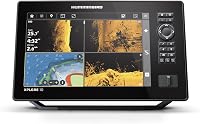
Garmin ECHOMAP Ultra 2 Bundle Guide
Choose a Garmin ECHOMAP Ultra 2 bundle by matching screen size and included sonar to your boat and fishing style. Check whether the box includes a traditional transducer, a LiveScope system, or only the display before you compare bundle names.
On this page (8 sections)
- What should you compare in a Garmin ECHOMAP Ultra 2 bundle?
- Is a 10 inch or 12 inch screen better?
- Which transducer and sonar come in the bundle?
- What’s in a Garmin 106sv LiveScope bundle?
- What does a 12 inch Garmin LiveScope bundle need?
- Which LiveScope bundles suit ice fishing?
- What should you check before buying?
- Which Garmin ECHOMAP bundle should you choose?
A Garmin ECHOMAP Ultra 2 bundle is the right fit when its screen size, sonar type and included components match your boat and fishing style. Check whether the bundle contains a display, traditional sonar transducer, LiveScope transducer and GLS 10 module, or a combination of those parts.
A 10 or 12 inch screen can make split views easier to read, but the larger size needs more console space. A LiveScope package adds forward, down or perspective scanning sonar, while an ECHOMAP display bundle without LiveScope may suit you if you want conventional sonar and mapping.
The words “106sv bundle” or “12 inch LiveScope bundle” don’t guarantee the same contents from one package to another. Use the model number and included-components list to compare the actual screen, transducer and sonar module.
What should you compare in a Garmin ECHOMAP Ultra 2 bundle?
Compare four things first: display size, display model, transducer type and sonar module. These determine what you can see and which extra parts you may need.
| Bundle detail | What to check | Why it matters |
|---|---|---|
| Display size | 9, 10 or 12 inches | A larger screen needs more console space and can give split views more room |
| Display model | Exact ECHOMAP series and model | Similar names can refer to different displays or packages |
| Transducer | Exact transducer name and supported views | This determines the sonar included in the package |
| Sonar module | Whether GLS 10 is included | LiveScope Plus uses the GLS 10 module |
| Mounts and cables | Included mounts, power and network cables | Missing parts may need to be bought separately |
| Power setup | Boat power or portable battery | A portable ice fishing setup has different needs |
A bundle is a package choice, not a single standard configuration. Read the contents line by line before you decide that a particular screen size comes with LiveScope.
If you’re sorting out display compatibility, our guide to Garmin ECHOMAP units with LiveScope Plus explains what to check between a display and the LiveScope system.
Is a 10 inch or 12 inch screen better?
A 10 inch screen is a practical choice if you want room for charts and sonar while keeping the console footprint in check. A 12 inch display can make a split view larger, but it requires enough mounting space and a clear sightline.
The best screen size depends on where you’ll mount the unit and which views you use at once. Before choosing, measure the console and check the display’s mounting dimensions, bezel and cable clearance.
| Screen size | Consider it if | Check before choosing |
|---|---|---|
| 9 inches | You want a smaller display or portable setup | Whether the split view is comfortable to read |
| 10 inches | You want a middle ground for charts and sonar | Mounting space and the exact display model |
| 12 inches | You often use more than one view at once | Console fit, sightline and exact bundle contents |
A bigger display doesn’t add sonar capability by itself. The transducer and compatible sonar components determine what sonar views are available.
Searches for a “Garmin 106sv bundle” can lead to packages with different included transducers or add-on systems. Confirm the precise ECHOMAP model and the full contents rather than using screen size or the “sv” label as a shortcut.
Which transducer and sonar come in the bundle?
The transducer determines which sonar information you can view, while a LiveScope bundle also needs the related sonar module. Check the transducer model and supported views rather than assuming every ECHOMAP package includes the same sonar.
LiveScope Plus uses the LVS34 transducer and GLS 10 sonar module. The system supports Forward, Down and Perspective modes, with the mounts needed for those configurations included in the LiveScope Plus System package described below.
Other ECHOMAP bundles may include a conventional transducer for CHIRP, ClearVü or SideVü sonar, depending on the exact package. Compare those names with the views you plan to use and confirm whether the transducer is in the box.
For a closer look at the LiveScope parts, read what you need for a Garmin LiveScope Plus system. If you’re comparing the newer sonar system with the earlier version, see Garmin LiveScope Plus vs LiveScope.
Which Garmin LiveScope Plus transducer belongs in your setup?
The LVS34 is the transducer included with the Garmin LiveScope Plus System and the LiveScope Plus Ice Fishing Bundle described here. The ice fishing bundle specifies an LVS34-IF transducer for its pole-mount setup.
The transducer choice affects how you mount and position the sonar. Compare Garmin LiveScope transducers if you need to match a transducer to your mount or fishing setup.
What’s in a Garmin 106sv LiveScope bundle?
A Garmin 106sv LiveScope bundle should include a compatible display plus the components needed to run the LiveScope system. Verify the display model, LVS34 transducer, GLS 10 module, power and network cables, mounts and any other accessories in the exact package.
The term “106sv bundle” alone doesn’t confirm that the GLS 10 and LVS34 are included. A display might be sold by itself, paired with a conventional transducer, or packaged with LiveScope components.
Before ordering, make a quick checklist:
- Exact display model and screen size
- LVS34 or other included transducer
- GLS 10 sonar module
- Power and network cables
- Transducer mounts for your intended position
- Any required mapping or mounting accessories
If a bundle includes LiveScope, check the included mounting parts against your boat. The LiveScope Plus System includes trolling motor barrel and shaft mounts, along with a perspective mount bracket.
What does a 12 inch Garmin LiveScope bundle need?
A 12 inch Garmin LiveScope bundle needs a compatible 12 inch ECHOMAP display and the LiveScope system components if you want LiveScope sonar in the same setup. Confirm the display model, LVS34 transducer, GLS 10, cabling and mounts together.
A large display can help when you want to keep a chart visible beside sonar. It also takes up more space, so check the console before treating a 12 inch package as an automatic upgrade.
This system is not a complete ECHOMAP display bundle. Its display is sold separately, so pair it with a compatible unit and verify that the intended network and power connections are covered.
Which LiveScope bundles suit ice fishing?
A portable ice fishing bundle suits you when you want the screen, LiveScope sonar, pole mount and power supply in one package. Check the battery and charger as well as the transducer and display.
Garmin’s LiveScope Plus Lithium-ion Ice Fishing Bundle includes a 9 inch ECHOMAP UHD2 touchscreen combo and a lithium-ion battery with charger. Its package also includes a portable fishing bag, power cable, ice fishing pole mount and tilt mount.
Garmin says the system supports LiveScope Forward and Down modes and can show up to 200 ft in any direction. That is a manufacturer claim; your results depend on setup and conditions.
If you’re choosing LiveScope for use beyond ice fishing, learn how to use Garmin forward facing sonar. You can also check what a Garmin LiveScope Plus system needs before selecting a display bundle.
What should you check before buying?
Check fit, compatibility and included parts before choosing a bundle. A model name or screen size doesn’t tell you whether the sonar components you need are in the box.
- Measure the mounting area and cable clearance.
- Confirm the exact ECHOMAP display model and screen size.
- Identify the included transducer by model name.
- Check whether a GLS 10 module is included if you want LiveScope Plus.
- Confirm the mounts fit your intended mounting position.
- For ice fishing, verify the battery, charger, case and pole mount are included.
If software setup is part of your plan, review the steps for a Garmin LiveScope update before you head out. If you’re considering a longer-range system, check the components required to run Garmin LiveScope XR.
Which Garmin ECHOMAP bundle should you choose?
Choose a 10 inch bundle when it fits your console and gives you enough room for the views you use. Choose a 12 inch LiveScope setup if the larger display fits and you want more space for split views, then confirm the GLS 10, transducer, cables and mounts are included.
For ice fishing, the 9 inch LiveScope Plus bundle includes a display, transducer, sonar module, pole mount, battery and charger. If you already own a compatible display, the LiveScope Plus System can add sonar without buying another ECHOMAP screen.
The Fish Finder Critic picks below offer useful comparison points for LiveScope components and portable sonar setups.
Frequently asked questions
Does a Garmin ECHOMAP Ultra 2 bundle always include LiveScope?
No. Bundle contents vary, so check whether the package includes a LiveScope transducer and GLS 10 sonar black box, as well as the compatible ECHOMAP display.
Some packages focus on the chartplotter and conventional sonar transducer instead.
Confirm each component before comparing bundle names.
What screen size should I choose for a Garmin 106sv bundle?
A 10-inch display can give sonar and chart views more room than a smaller screen, while a 12-inch display can make split views larger if your console has the space. Measure the mounting area and check the exact model name, since screen size alone doesn't confirm bundle contents.
Is a 9-inch LiveScope bundle enough for ice fishing?
A 9-inch ice fishing bundle can be a self-contained choice when it includes the ECHOMAP display, LiveScope components, pole mount, battery and charger. Garmin's LiveScope Plus Ice Fishing Bundle includes those items, with an LVS34-IF transducer and GLS 10 sonar module.
What is included in the Garmin LiveScope Plus system?
The Garmin LiveScope Plus System includes the GLS 10 sonar module, LVS34 transducer, mounts for a trolling motor barrel and shaft, a perspective mount bracket, power cable, network cable, network adapter cable and documentation. It needs a compatible Garmin ECHOMAP or GPSMAP display, sold separately.
Can I use the LVS34 transducer with an older GLS 10?
Garmin says the LVS34 transducer can be used with an existing LiveScope System GLS 10 black box as an upgrade. Check your display compatibility and the exact system components before buying, since the transducer and black box do not include an ECHOMAP display.