How Does a Fish Finder See Underwater? Explained Simply
On this page (9 sections)
- Understanding How Fish Finders Use Sound to See Underwater
- The Core Technology: What is Sonar?
- From Echo to Image: How the Screen Displays Data
- Why Fish Appear as Arches and How to Tell
- Using Your Fish Finder for Real Success
- What to Look for When Choosing a Fish Finder
- Common Myths and Realities
- Conclusion
- Frequently Asked Questions
A fish finder sees underwater by using sonar technology to send sound waves through the water. For a phone-connected option, see what a wireless fish finder offers. When these waves hit an object, they bounce back as echoes, and the device interprets these echoes to create an image on its screen.
This process lets you spot fish, underwater structures, and the lake or ocean bottom without diving in. We
Understanding How Fish Finders Use Sound to See Underwater
A fish finder’s ability to see beneath the surface is based on a simple principle of sound waves. It does not use light or cameras. Instead, it sends a pulse of sound downward and listens for the return echo. This process is often compared to how bats use echolocation or how a submarine navigates. The device measures the time it takes for the echo to return to determine distance.
We found that this technology is so reliable it is used by the US Navy for mapping ocean floors. For your fishing trips, it translates complex data into an easy-to-read image on your screen. The image shows you the bottom contour, structure, and fish. It helps you make smarter decisions about where to cast your line.
The Core Technology: What is Sonar?
Sonar stands for Sound Navigation and Ranging. It is the heart of every fish finder. A sonar system has two main parts: a transducer and a display screen. The transducer is the device that sends and receives the sound waves. It is usually mounted on the transom or the hull of your boat.
The display screen takes the raw echo data and turns it into a picture. This picture is a cross-section view of the water column below your boat. Imagine drawing a line from your boat straight down to the bottom. The fish finder shows you what is along that line. It is like having x-ray vision for water, but using sound instead of rays.
How the Transducer Works
The transducer is a crucial component. It contains a special crystal that vibrates when electricity is applied. This vibration creates a sound wave, or ping. The ping travels through the water at a speed of about 4,800 feet per second. When it hits something—like a fish, a rock, or the bottom—it bounces back.
The transducer then listens for this returning echo. The time delay between sending the ping and receiving the echo tells the unit how far away the object is. We found that transducers typically operate in one of two frequency ranges: 50 kHz and 200 kHz. Lower frequencies go deeper, while higher frequencies give better detail in shallower water.
Frequency and What It Means for You
The frequency of the sonar pulse affects two things: detail and depth. A higher frequency, like 200 kHz or 455 kHz, provides a sharp, detailed image. It is great for seeing individual fish and small structures. However, its signal does not penetrate as deep into the water.
A lower frequency, like 50 kHz or 83 kHz, can reach greater depths. The trade-off is that the image becomes less detailed. You might see a general area of fish, but not every single one clearly. Most modern fish finders let you switch between frequencies. This flexibility helps you adapt to different fishing spots and conditions.
From Echo to Image: How the Screen Displays Data
Once the echo returns, the fish finder’s processor gets to work. It calculates the distance to the object based on the echo’s return time. It also measures the strength of the echo. A hard object, like a rock or a boat wreck, produces a strong, dense echo. A soft object, like a school of baitfish or mud, produces a weaker echo.
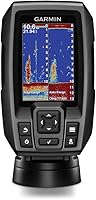
The screen translates this data into a visual display. Strong echoes appear as dark, thick lines on the bottom. Weaker echoes show up as lighter-colored marks. fish arches are the classic symbol for fish. They appear as curved lines because the fish swims through the sonar cone. The arch shape happens because the sonar measures the distance to the fish as it enters, passes through, and exits the cone.
Understanding the Sonar Cone
The transducer does not shoot sound in a straight, narrow line. It sends it out in a cone-shaped pattern. Think of it like a flashlight beam underwater. The width of this cone is called the beam angle. A narrow beam, like 15-20 degrees, gives a detailed view of a small area directly below you. A wide beam, like 40-60 degrees, covers a larger area but with less detail.
Many fish finders have a dual-beam transducer. This combines a narrow and a wide beam. You can often choose which beam to view on the screen. For deep-sea fishing, a wider beam helps cover more ground. For spotting structure in a lake, a narrow beam gives you the precision you need.
Reading the Screen Like a Pro
The screen shows a history of what the boat has passed over. The newest data appears on the right side. Older data scrolls to the left. This creates a continuous, scrolling picture. The bottom line is the most important. It shows the shape of the bottom—flat, sloping, or rugged. Drop-offs and points are prime fishing spots.
Fish appear as marks or arches between the surface and the bottom. A stationary fish might look like a streak. A moving fish creates an arch. The size of the arch can indicate the fish’s size. Larger fish produce larger, thicker arches. You can also see weeds, timber, and other structure. All of this helps you identify where fish might be hiding.
| Sonar Type | How It Works | Best For | Typical Use |
|---|---|---|---|
| Traditional 2D Sonar | Sends a cone-shaped pulse downward. Creates a 2D cross-section image. The most common type. | General fishing, spotting fish arches, basic depth reading. | Lakes, rivers, coastal fishing. |
| CHIRP Sonar | Sends a continuous range of frequencies, not just one. Provides clearer images and better target separation. | Seeing individual fish in a school, detailed structure mapping. | Both shallow and deep water fishing. |
| Down Imaging / Side Imaging | Uses a thin, wide beam to scan downward or to the sides. Creates a photo-like picture of the bottom and structure. | Mapping large areas, finding submerged timber, rocks, and wrecks. | Finding specific structures in larger bodies of water. |
| Live Sonar | Scans in real-time, showing movement of fish and bait. It updates the image constantly as the boat moves. | Watching how fish react to your lure, active fishing strategy. | Advanced anglers seeking real-time interaction. |
Why Fish Appear as Arches and How to Tell
You might wonder why fish show up as arches instead of simple dots. This is due to the sonar cone geometry. As a fish enters the cone, the distance to it is longer. The sonar records this as a mark near the top of the cone. As the fish passes through the center of the cone, the distance is shortest. The mark moves to the bottom of the cone on the screen. As the fish exits, the distance lengthens again, moving the mark back up.
This movement creates the arch shape. A perfect arch means the fish swam through the center of the cone. A partial arch means it was on the edge. If you are stationary, a passing fish will still create an arch. The key is that the arch tells you the fish is moving relative to your transducer. It is a reliable indicator, not just a random mark.
Distinguishing Fish from Other Objects
Not every mark is a fish. Weed beds, logs, and rocks can look similar at first glance. The difference often lies in the echo strength and shape. A hard bottom or rock will appear as a thick, solid line. A fish will appear as a distinct mark or arch, often with some space above and below it.
We found that using the sensitivity or gain setting on your fish finder helps. Higher sensitivity shows more detail but can create clutter. Lower sensitivity makes the screen cleaner but may miss smaller fish. It’s about finding a balance. Many units have an auto-sensitivity feature to adjust this for you. Experiment with it to see what works best in your local waters.

Using Your Fish Finder for Real Success
Knowing how it works is one thing. Using it to catch more fish is another. Start by using the fish finder to scan an area. Drive slowly over a drop-off or point. Watch the screen for changes in the bottom contour. Look for fish marks near these structural changes. Fish often hold near these transition zones.
Once you find a promising spot, mark it as a waypoint. Your fish finder’s GPS function can save the location. You can return to the exact same spot later. This is especially useful for marking productive fishing holes. Remember, the fish finder is a tool. Your fishing skill and knowledge of the water are still essential. The device just gives you more information to work with.
Adjusting Settings for Different Conditions
Water clarity, depth, and fish type all affect how you should set your fish finder. In murky water, the sonar might not penetrate as well. You may need to lower the frequency. In very deep water, switch to a lower frequency for better depth range. If you are targeting large game fish, pay attention to the larger arches on the screen.
Adjusting the depth range is also important. If the water is 30 feet deep, set the range to 50 feet. This ensures you see the bottom and the entire water column. A range that is too high or too low can cause you to miss key information. Take a moment to check your settings when you arrive at a new fishing spot. A small adjustment can make a big difference in what you see.
What to Look for When Choosing a Fish Finder
If you are shopping for a fish finder, the technology can feel overwhelming. Focus on a few key features. First, consider the transducer type. A basic 2D sonar is great for beginners. CHIRP sonar offers a clear upgrade in image quality. Down and side imaging are excellent for mapping and finding structure.
Next, look at the display size and resolution. A larger screen with higher resolution is easier to read. It shows more detail on the image. Screen size is measured diagonally, just like a TV. A 5-inch screen is compact for small boats. A 7-inch or 9-inch screen is better for larger boats and more data. Consider how many sonar types you want. A combo unit that includes GPS and chart plotting is very useful.
Key Features Checklist for Your First Fish Finder
- CHIRP Sonar: Provides clearer images and better target separation. Essential for seeing individual fish.
- GPS Capability: Allows you to save waypoints and navigate to productive spots. Very helpful for returning to good fishing areas.
- Adjustable Sensitivity: Lets you fine-tune the image to reduce clutter and improve clarity in different conditions.
- Depth Alarm: A useful feature that beeps when the water reaches a set depth. Helps avoid running aground in shallow areas.
- Waterproof Display: A must-have for all-weather use. Ensure the unit is rated for exposure to rain and spray.
- Built-in Mapping: Many units include basic maps of lakes and coastlines. This helps you navigate and find underwater features.
Common Myths and Realities
Many new
Conclusion
You now know a fish finder doesn’t use magic—it uses sound. The system sends a sonar ping, listens for the echo, and translates that data into a picture of what’s below your boat. This gives you a clear view of fish, structure, and the bottom contour. You can see drop-offs, rocks, and fish arches, helping you decide exactly where to cast. The next time you’re on the water, pay close attention to your screen. Notice how the image changes as you move over different bottoms. Use the GPS to mark that promising spot you found, and return to it with confidence.
Frequently Asked Questions
Can a fish finder see through deep water or murky conditions?
Yes, but performance depends on the frequency you use. Lower frequencies (like 50 kHz) penetrate deeper water more effectively. In murky conditions, sonar can still work, but you might need to adjust the sensitivity to reduce clutter from suspended particles.
Why doesn’t my fish finder show any fish on a clear day?
Several factors could be at play. The fish may be holding very tight to the bottom or deep structure. Try adjusting your depth range and sensitivity settings. Also, ensure your transducer is mounted correctly and has a clear path through the water.
Do I need to be moving for the fish finder to work?
No, it works perfectly well when you are stationary. However, the screen will stop scrolling. Many anglers like to drift or move slowly to scan a larger area and create a continuous image of the bottom they are passing over.
What is the difference between CHIRP and traditional sonar?
Traditional sonar sends out a single frequency ping. CHIRP sonar sends a continuous sweep of frequencies. We found that CHIRP provides better target separation, making it easier to see individual fish within a school or detail in structure.
Can I use a fish finder in freshwater and saltwater?
Absolutely. The core sonar technology works in both. However, ensure your unit is rated for saltwater use if that is your primary environment, as saltwater can be more corrosive. The frequency choice for depth and detail remains the same principle.

![[FishPRO® 2026 Upgrade] NO.1 HD 1080P Underwater](https://m.media-amazon.com/images/I/81uKVIzYEEL._AC_SL200_.jpg)