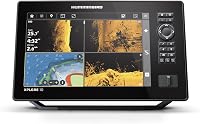
Side Imaging vs Down Imaging Fish Finders: Which Is Better? (November 2026)
Choose side imaging to scan water beside the boat and down imaging to see structure below it. Your fishing depth, boat path and need to cover new water help decide which view is more useful.
On this page (7 sections)
Choose side imaging to scan water beside the boat and down imaging to see structure below it. Your fishing depth, boat path and need to cover new water help decide which view is more useful.
Side imaging helps you look across a wider area around the boat. Down imaging focuses on what lies below, which can make it easier to inspect a spot directly under your route.
The right choice depends on where you need to look, whether your equipment supports the view and how you plan to read the screen. This comparison explains the tradeoffs and shows how to match a fish finder to your fishing.
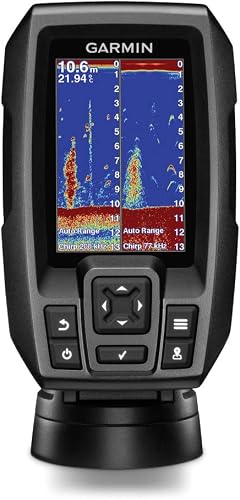 Best for simple sonar and waypoints
Garmin 010-01550-00 Striker 4 with Transducer

Side imaging vs down imaging: what’s the difference?
Side imaging scans to the sides of the boat, while down imaging scans below it. Both are imaging sonar views, but they answer different questions about the water.
Side imaging can help you search around a boat path for structure or targets off to either side. Down imaging can help you examine what sits under the boat, including objects and structure along the route.
For a quick primer, read What Is Side Imaging on a Fish Finder? The Short Answer.
It explains the side facing view and the basic idea behind its screen image.
The name of a sonar view matters, but so does the full setup. The display and transducer need to support the view you want to use.
When is side imaging more useful?
Side imaging is more useful when you want to search beside the boat instead of only looking straight down. It can help you cover water near your path while keeping the boat in motion.
That view may help when you want to scan around a point, locate a stretch of structure or check water beside a shoreline. It doesn't replace careful boat positioning or the need to decide what a sonar return means.
Side imaging works best when you have room on the display to interpret what appears to either side. A larger screen can make it easier to view more than one sonar panel, but the size you need depends on your setup and preferences.
What can you see on side imaging?
Side imaging can show fish and underwater structure as sonar returns beside the boat. The screen image isn't a photo, so interpreting shapes and shadows takes practice.
Our guide to What Do Fish Look Like on Side Imaging? The Short Answer covers what to look for as you learn to read the display.
Compare the image with your boat position and depth instead of treating one return as a certain fish identification.
What should you check before using side imaging?
Check that the fish finder supports side imaging and that its transducer is suitable for that view. Also plan the mounting position so the transducer can send and receive signals without an obvious obstruction.
A fish finder that offers only traditional and down scanning sonar won't gain a side view from a side imaging compatible transducer alone. If you're comparing equipment, best humminbird side imaging and best fish finder with side scan are useful next reads for considering models built around side scanning.
When is down imaging more useful?
Down imaging is more useful when you want to inspect what's beneath the boat. It keeps your attention on the water directly below your path rather than scanning out to the sides.
Use it to look more closely at submerged structure or objects as you pass over them. Traditional sonar can also be useful alongside down imaging, since the views present underwater information in different ways.
A down view may suit fishing where you follow a channel or move over likely structure. If you need to cover water beyond that track, side imaging can give you a broader look around the boat.
The Garmin STRIKER Vivid 4cv includes CHIRP traditional sonar and CHIRP ClearVü scanning sonar. The ECHOMAP UHD2 54CV also includes CHIRP traditional and ClearVü scanning, plus US coastal maps.
Neither product's listed sonar features include side imaging.
Which view is better for finding structure?
Use side imaging to search beside the boat and down imaging to examine structure directly underneath. Choose according to where you expect the structure to be relative to your route.
If you're covering unfamiliar water, side imaging can help you check a wider area without steering over every possible target. When you've reached a spot, down imaging can help you inspect the area beneath the boat.
You may use both views at different stages. Search with a side view, then adjust your position to pass over a promising spot and examine it with a downward view.
The Garmin Striker 7SV with Transducer supports CHIRP traditional sonar plus ClearVü and SideVü scanning sonar. That's a fit for anglers who want both scanning directions in one setup.
Do you need one sonar view or both?
Choose one view if it fits the kind of fishing you do most; choose both if you regularly search beside the boat and inspect below it. Your use matters more than the number of sonar modes on a feature list.
Down imaging may be enough if your main goal is to study the water directly below the boat. Side imaging may be a better match if you want to scan off to the sides while moving across an area.
A combined setup adds flexibility, but check what comes with the fish finder and what equipment it needs. Look at the display size, transducer and supported sonar types before you make the choice.
Which models fit these sonar needs?
The Garmin Striker 7SV is the only product in this comparison whose listed sonar includes both ClearVü and SideVü scanning. The other three include down scanning features, but their listed sonar doesn't include side imaging.
The Striker 7SV has a 7 in sunlight readable display, built in GPS and Quickdraw Contours mapping software. The ECHOMAP UHD2 54CV has a 5 in keyed display, ClearVü scanning and US coastal maps.
The STRIKER Vivid 4cv offers a 4 in color display with CHIRP traditional and ClearVü scanning sonar. The STRIKER 4 has a 3.5 in display, CHIRP traditional sonar and ClearVü scanning, plus a waypoint map and built in flasher.
For a closer comparison of one brand's side imaging options, see best humminbird side imaging transducer. Check compatibility between the transducer and display before you buy.
How do you choose between the two?
Start with the direction you need to scan, then confirm the fish finder and transducer support that view. This keeps you from choosing by a sonar label alone.
Use this decision guide:
- Choose side imaging if you want to search water beside the boat.
- Choose down imaging if you want to inspect what's directly below.
- Choose both if you often search a wider area and then examine specific spots.
- Check the transducer if you plan to add a view to a fish finder you already own.
Think about how you fish, how much space you have for a display and whether you can make sense of the screen while steering. A wide scan won't help if you rarely use it, and a downward view may not help you locate structure beside your route.
Fish finders need practice to read well. [Do Fish Finders Really Work?
What to Know](/do-fish-finders-really-work/) explains what sonar can tell you and why results depend on setup and interpretation.
Which should you choose: side imaging or down imaging?
Pick side imaging if your priority is scanning beside the boat; pick down imaging if you mainly need a closer view below it. Choose both if you regularly move from searching an area to checking a specific spot.
For side and down scanning in one fish finder, the Garmin Striker 7SV includes ClearVü and SideVü scanning sonar. For a down scanning setup with mapping or a compact display, consider the ECHOMAP UHD2 54CV, STRIKER Vivid 4cv or STRIKER 4 according to the features you need.
Review the sonar support and transducer before settling on a model. A supported, useful view is a better fit than an extra sonar mode you won't use.
Our score weighs specs, features and buyer feedback against what you're shopping for.
Frequently asked questions
Is side imaging better than down imaging?
Side imaging is better for checking water beside the boat, while down imaging is better for viewing structure directly below it. Neither is always better.
Choose based on whether you need to search a wider area or inspect what lies under your current path.
Can one fish finder show both side and down imaging?
Yes, some fish finders support both side and downward scanning views. Check the exact sonar features and transducer included with the model, since a screen alone doesn't tell you which views the setup can provide.
Does down imaging show fish?
Down imaging can show fish and structure beneath the boat as sonar returns on the display. Learn to compare those returns with the view from traditional sonar, since the screen image takes practice to interpret.
Do you need side imaging in shallow water?
Side imaging can help scan beside a boat in shallow water, but usefulness depends on conditions, boat movement and setup. Down imaging can be more direct when you want to focus on the water below your path.
Can you add side imaging with a new transducer?
A new transducer can provide side imaging only when the fish finder supports that sonar view and is compatible with the transducer. Check both before buying; a transducer by itself can't add a feature the display doesn't support.